 GitBucket
@page Other @subpage HowTo @page HowTo How To Guide
To be placed here are various topics such as:
- Release Process
- Version Control
- CI
- etc
@page Other @subpage _3DMaths @page _3DMaths 3D Maths
In the context of computer graphics, there are two main entities, Matrixes and Vectors. There are others, such as Quaternions etc.
We will be mainly dealing with Euclidean Space, using Cartesian coordinates. Space is assumed uniform with 3 dimensions, X,Y and Z that represent distance along perpendicular axes from a single origin.
A Vector is a tuple of X,Y,Z values and can be used to represent a number of distinct concepts:
- It can be used to represent a Point in these 3 cartesian dimensions.
- It can be used to represent a Direction and Length from some point towards another point.
- It can be used to represent just Direction (where the Length is ignored or the vector is normalized).
- Sometimes also used for holding rotation angles about the three axes, but more about that later.
There can be different frames of reference with-in this Euclidean Space. These are called different 'Spaces'. For example an object might be modelled in a Local Space or Local Coordinate System where all points are relative to a local origin of the object. Moving the origin like this is called 'Translation'. In general this is called a 'Transformation', the main ones are:
- Translation
- Rotation
- Scale
A Matrix can be a 3x3 or 4x4 set of values and can be used to apply transformations to a vector by multipling them. Transformations can be combined by multipling matrixes together.
Usually these spaces can be encountered:
- Model/Object - local to the object
- World - global for all objects
- View - the world relative to a view's frame of reference
- Camera - depending on context, this can be the inverse of the view
- Light
- Projection/Screen - the view projected to a screen (a perspective transformation)
Naming conventions:
Adding the space that a vector is in to the identifier can help to avoid using it in the wrong context. eg:
vec4 myPoint;
becomes:
vec4 myWorldSpacePoint;
or for short:
vec4 myPointWorld;
or:
vec4 myPointWS;
Another idea is to make new alias types that ensure correctly corresponding types are used together. eg:
vec4ws myPoint;
Matrixes transform from one coordinate system to another. For naming these, using the two spaces in the name helps, and also the direction of the transform. eg:
mat4 WorldToViewMatrix;
However using 'From' instead of 'To' can make the code more readable, therefore this is preferred:
mat4 ViewFromWorldMatrix;
We can then write:
vec4 viewVec = viewFromWorldMatrix * worldVec;
This groups the spaces used together following the normal maths rules for how matrixes work. View is grouped next to view, and world next to world. The same could apply when combining matrixes together.
Types could also be used for preventing errors.
A Matrix type could be templated to take spaces and can ensure the corresponding space Vectors are using.
eg:
  vec4<World> worldVec;
  mat4<View,World> viewFromWorldMatrix;
  vec4<View> viewVec = viewFromWorldMatrix * worldVec;
The Matrix class could be implemented to transform points thus:
vec4<Dest> operator*(const vec4<Src>& aVec);
And could be implemented to combine Matrixes this way:
  template <T>
  mat4<Dest,T> operator*(const mat4<Src,T>& aMat);
Points verses directions and direction lengths could also be different types.
Rotations
Rotations as mentioned before could be implemented using a Vector. However the order of applying the rotation about each axis is then important and this can be convention. Coordinate systems can be left handed or right handed adding confusion.
https://www.cs.uic.edu/~jbell/CourseNotes/ComputerGraphics/diagrams/coord.gif
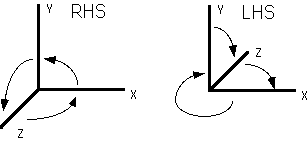
Other ways to represent rotations are as a 3x3 (or 4x4) matrix.
And also as a Quaternion. The preferred is using Quaternions as these are only 4 values, so are smaller and avoid various other issues such as Gimbol Lock.
A Quaternion being 4 values could therefore be put in a vec4 object, but it is common that a different type is used so as to not confuse it. But why not extent using a compilers type system for treating the different uses of a vec4 even more.
Vectors
A point/position type A direction type / unit vector A displacement type A screen point
// A World position:
pos4<World> mPos;

// A direction (note doesn't need a space):
dir4 mDir;

// A offset displacement:
off4 mOffset;